
Finding the perfect SketchUp textures for your 2025 projects just got easier! High-quality PBR materials are essential for realistic renders, but manual workflows can drain your creative time. That’s where D5 Render changes everything – offering seamless SketchUp texture integration with real-time previews and AI enhancements. Say goodbye to tedious imports and hello to instant, photorealistic results. Discover how to elevate your SketchUp textures with today’s smartest workflow solutions!
Key Takeaways on Best Sketchup Textures
- High-quality SketchUp textures elevate realism - PBR 텍스처 provide true-to-life material properties like accurate reflections and roughness, essential for photorealistic 3D models.
- Traditional texture libraries slow workflows – While they offer free PBR textures, manual importing and tweaking in SketchUp eat up valuable design time.
- D5 Render streamlines the process – With 16,000+ drag-and-drop assets, real-time adjustments, and AI-powered tools, it transforms SketchUp textures instantly—no more tedious imports or guesswork.

1. Why High-Quality Textures Matter in SketchUp
Creating realistic 3D models in SketchUp relies heavily on high-quality textures. Whether you’re designing architecture, interiors, or game assets, textures add depth, material accuracy, and lifelike details. Poor-resolution or mismatched textures can ruin realism, making surfaces appear flat or unnatural.
함께 Physically Based Rendering (PBR) textures, SketchUp models achieve true-to-life materials—correctly reacting to light with accurate reflections, roughness, and bump effects. Free texture resources help, but integrating them efficiently requires tools like D5 Render, which enhances texture application with real-time adjustments and AI-powered optimization.
2. Traditional SketchUp Textures Websites
Traditional texture websites typically offer high-quality PBR 자료 for your designs, but they require manual downloads, UV adjustments, and constant tweaking in SketchUp—slowing down even simple projects. While these free resources are invaluable, they often leave you with:
- Inconsistent quality across different sources
- Time-consuming workflows (importing, scaling, testing renders)
- Limited real-time previews of how textures will actually look
Below, we compare 5 top free texture sources—and show how D5 Render solves their limitations while supercharging your workflow:
| Website | 개요 | Pros | Cons | D5 Render’s Advantages |
|---|---|---|---|---|
| 폴리 헤이븐 | Free CC0-licensed HDRIs & PBR textures for environmental lighting | ✔ Free studio-quality PBR textures with community updates, no registration needed. | ❌ Textures require manual download and application, with no real-time previews available before rendering. | ✅ 14,000+ ready-to-use assets with real-time adjustments, sync, and instant previews. |
| Poliigon Free | High-end free tier from premium texture provider | ✔ Pro-grade scanned textures with monthly free releases for ultra-realism. | ❌ Limited free textures (5-10/month), manual download, no displacement maps. | ✅ Skip monthly hunts with real-time synced PBR materials including displacement. |
| AmbientCG (CC0 Textures) | Massive library of 10,000+ CC0 PBR textures | ✔ Vast category selection with 1K-8K resolutions and consistent naming. | ❌ Manual downloads required, some textures lack real-world scale data. | ✅ Real-time sync with organized, real-world-scale PBR materials boosts efficiency. |
| SketchUp Texture Club | Dedicated texture resource for SketchUp users | ✔ UV-optimized SketchUp textures with lightweight files and simple tiling. | ❌ Limited sub-1000+ texture collection with outdated designs. | ✅ 2,000+ cutting-edge PBR materials and 12,000+ premium 3D models. |
| Texture Ninja | Newer free PBR texture library | ✔ Clean interface with direct game-ready asset downloads. | ❌ Manual downloads with limited architectural texture options available. | ✅ 16,000+ of premium assets with real-time sync for instant workflow. |
3. Why D5 Render is the Best Sketchup Textures Solution
While free SketchUp textures from external sources are helpful, manually importing and adjusting them can slow down your workflow. D5 Render solves this problem by offering an all-in-one solution that enhances texture quality while saving time. Here’s why it’s the best choice for SketchUp users in 2025:
① 16,000+ of Premium 자산, 당신의 명령대로
D5 Render comes with a massive library of high-quality PBR materials, including wood, metal, fabric, and concrete—all optimized for realism. Unlike external texture sites, where you must download and import files manually, D5 lets you drag and drop materials directly onto your model with no extra steps. This saves hours of searching, downloading, and UV mapping.
No more wasted time downloading and importing—just drag and drop materials directly onto your SketchUp model in D5 Render.
② Real-Time Adjustments for Perfect Textures
D5 Render’s real-time engine revolutionizes material editing for SketchUp textures. Instantly adjust roughness, reflectivity, and scale—seeing updates live without rendering delays. Architects and designers save time with immediate feedback, fine-tuning materials in seconds. The seamless workflow lets you experiment with SketchUp textures dynamically, ensuring photorealistic results faster. No more waiting; visualize changes as you tweak, perfect for rapid iterations and confident design decisions.
③ Seamless SketchUp Sync for a Smoother Workflow
D5 Render syncs seamlessly with SketchUp, instantly updating your model—including geometry, textures, and lighting—without re-importing. Edits to SketchUp textures appear in real time, ensuring accuracy and saving hours of manual adjustments. No more lost material tweaks or misaligned elements; everything stays perfectly synchronized. This streamlined workflow lets designers focus on creativity, not repetitive tasks, making it ideal for fast, high-quality visualizations.
④ D5‘s AI-Powered Materials for Next-Level Realism
D5 Render revolutionizes SketchUp textures with AI-driven tools that enhance realism and efficiency.
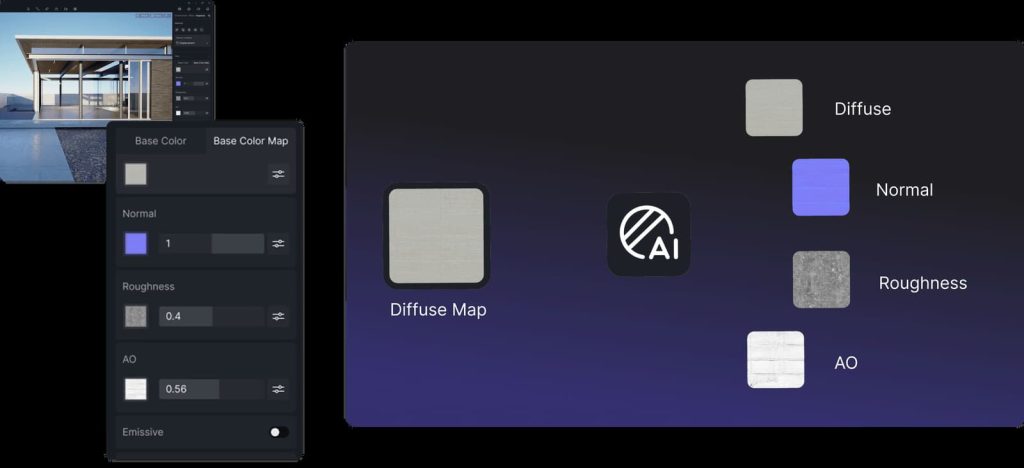
AI-Generated Material Texture Maps automatically create PBR-compliant maps (albedo, roughness, normal) from simple images, perfect for converting 2D textures into 3D-ready materials.
AI 틈새 제거 (Make Seamless) eliminates tiling artifacts, ensuring textures blend naturally—ideal for large surfaces like walls or flooring.
Meanwhile, AI 울트라 HD 텍스처(AI Ultra HD Texture) upscales low-resolution SketchUp textures without quality loss, preserving fine details. Together, these features automate manual tasks, letting designers focus on creativity while achieving studio-grade results faster.
D5 Render takes texturing further by eliminating manual work and boosting realism. With instant material access, real-time adjustments, and AI enhancements, it’s the fastest way to turn SketchUp models into stunning visuals.
4. Conclusion on Best Sketchup Textures
High-quality SketchUp textures are the secret weapon for stunning 3D designs, but manual workflows can slow you down. With D5 Render, you get the best of both worlds: instant access to 16,000+ premium assets, real-time adjustments, and AI-powered tools that automate tedious tasks. No more wasted hours on imports or tweaks—just seamless syncing and photorealistic results at lightning speed. For designers who want pro-quality textures without the hassle, D5 Render is the ultimate upgrade for SketchUp in 2025. Ready to transform your workflow? Try it today!
Read More: D5 Render Textures Explained
상위 10가지 지속 가능한 건축 자재 | D5 Render 가이드 >
FAQs on SketchUp Textures in D5 Render
❶ Why Do My SketchUp Textures Look Blurry in D5 Render?
Blurry textures often result from low-resolution source files. Use D5’s AI Ultra HD tool to upscale them or replace them with higher-quality assets from D5’s 16,000+ material library.
❷ Can D5 Render Fix Tiling Repeats in SketchUp Textures?
Yes! The AI 틈새 제거 (Make Seamless) feature automatically removes visible tiling patterns, ensuring natural-looking surfaces for walls, floors, and large-scale designs.
Seamless Texture Generator: D5 Render 시각 효과 향상 >
❸ How Do I Sync SketchUp Texture Changes to D5 Render Instantly?
D5’s live sync updates textures, geometry, and lighting in real time. Just edit in SketchUp—changes appear in D5 without re-importing or manual adjustments.
Want to Use SketchUp 2025 With D5? Here’s What You Need to Know >
❹ Are D5 Render’s PBR Textures Compatible With SketchUp’s Default Materials?
Absolutely. D5 converts SketchUp’s basic materials that include a base color texture into full PBR (albedo, roughness, normal maps) for realistic lighting reactions, while keeping your original workflow intact.
❺ What’s the Fastest Way to Apply Textures in D5 Render?
Drag and drop from D5’s built-in library or use AI Material Generator to create custom PBR textures from simple images—saving hours of manual setup.


 English
 Español
 Français
 한국어
한국어 日本語
日本語